AI Shipment Assistant: from unstructured email to structured search
Client
Air Cargo Platform · cargo.one
My role
Product Designer (UX/UI)
Year
2025 – 2026
Tools
AI-assisted workflow · B2B SaaS
My role
After an initial scoping phase with the PM to define feasibility and boundaries, I owned this project end-to-end: from defining the interaction model and edge case logic to writing and iterating the AI prompt, designing every screen state, and collaborating with an engineer who helped me set up a Postman environment for prompt testing.
I also built an n8n automation flow to run batch prompt tests across 100 real customer emails, iterating on the prompt until all cases passed reliably. The email forwarding agent, which reads incoming emails, creates shipments, and replies with a results link, was designed and defined as part of this same project scope.
The problem
Every shipment started with an email, outside the platform
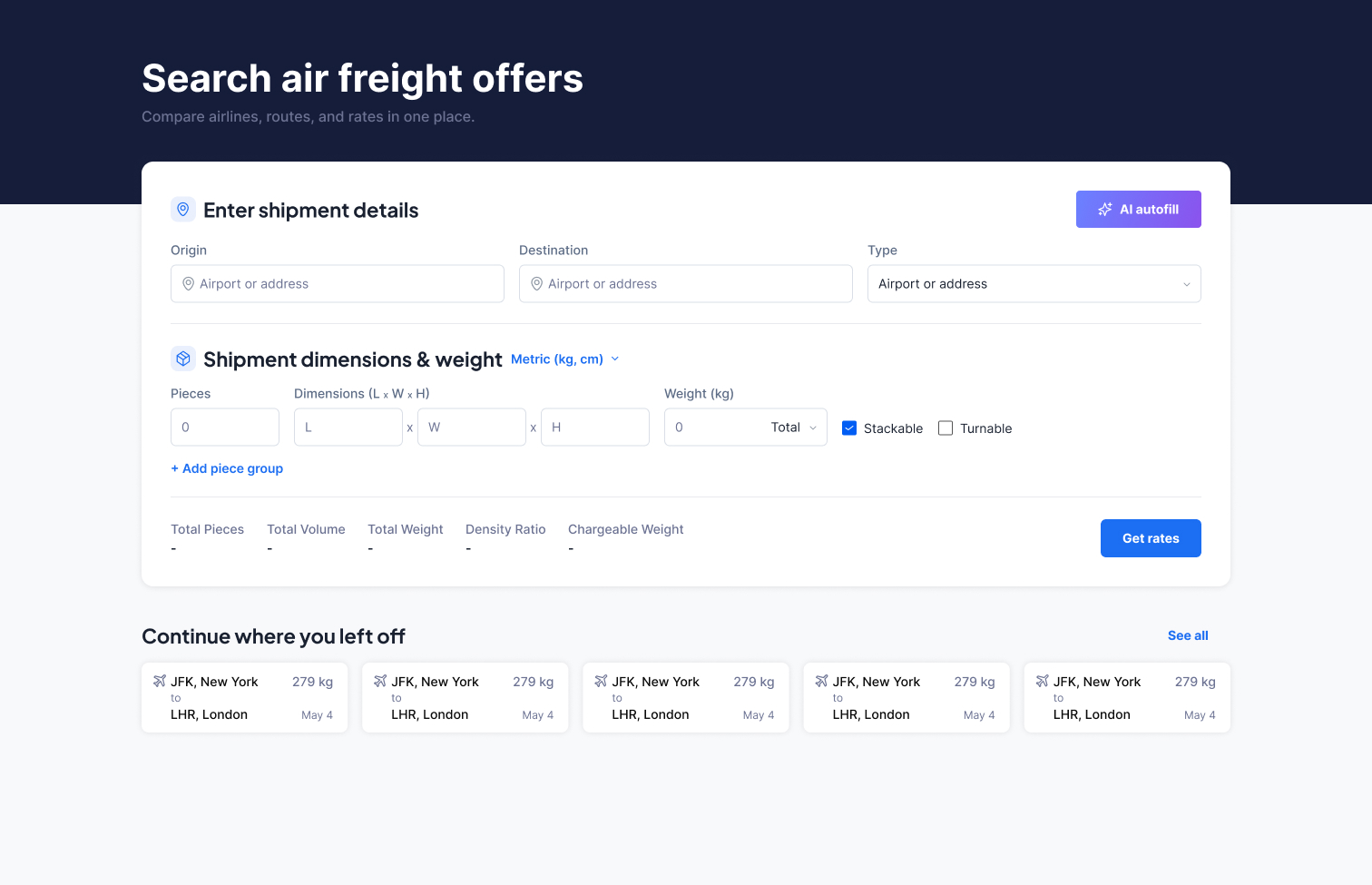
Freight forwarders receive customer shipment requests by email. To act on them, agents had to manually read the email, extract the relevant details, re-enter them into the platform, and only then begin searching for rates.
For a single shipment this might take 2–5 minutes. Across dozens of daily requests, this represented a significant portion of an agent’s working day spent on repetitive, error-prone data entry.
Beyond the time cost, the manual step introduced risk: misread dimensions, wrong cargo type, missed piece groups. In freight, an error at the search stage cascades into incorrect quotes and wrong bookings.
- · Manual extraction of shipment data from free-text emails
- · Repetitive re-entry of dimensions, weight, routes, and cargo type
- · No connection between where work started (email) and where it happened (platform)
- · High error risk, especially on shipments with multiple piece groups
- · Context lost every time a new search had to be initiated from scratch
Key design decisions
Four decisions that defined the experience
01
Blank over wrong
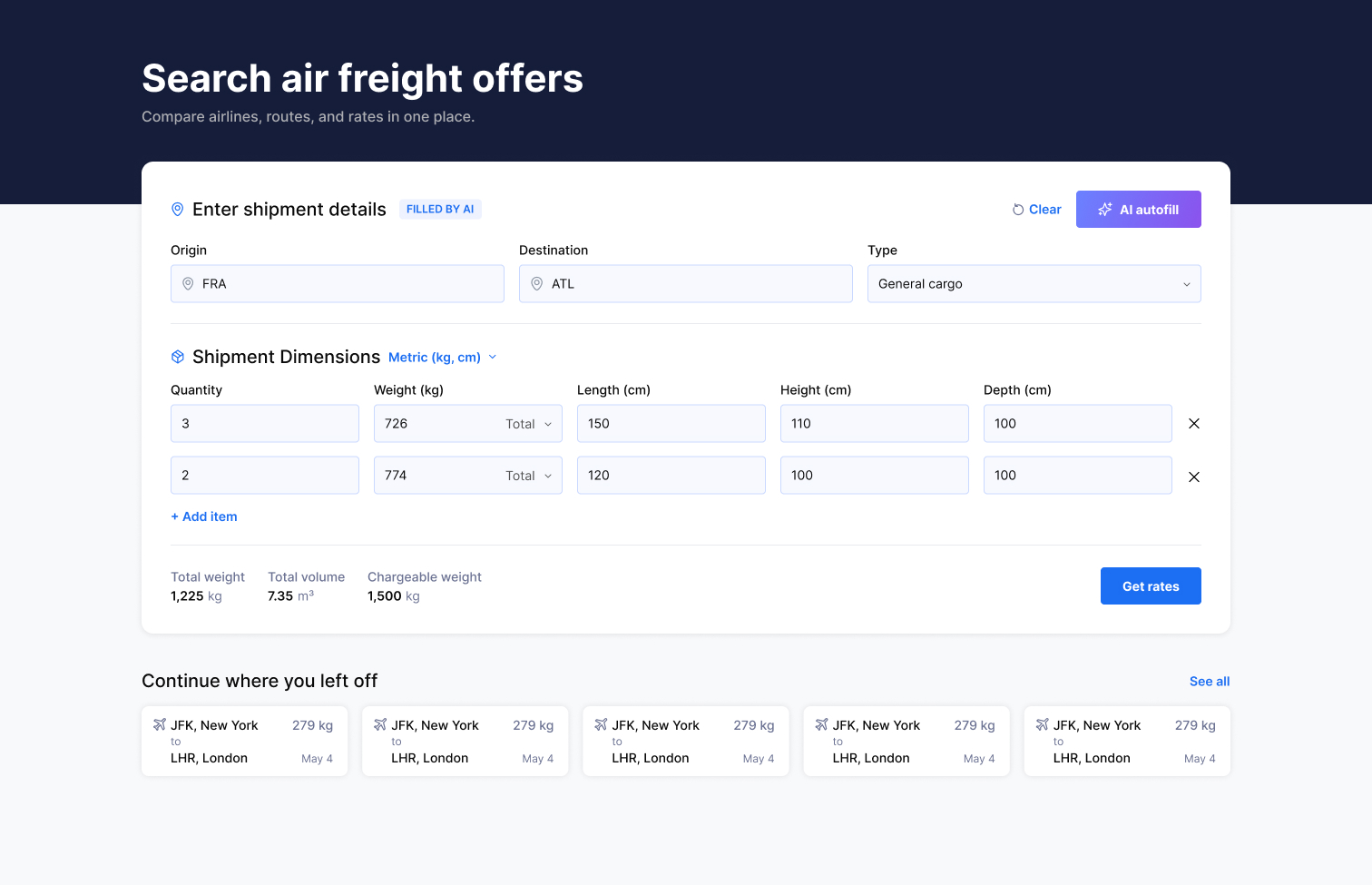
Fields that couldn’t be inferred were left empty and marked with a red border, never pre-filled with a guess. In a logistics context, an incorrect dimension is worse than a missing one: it produces wrong rates and wrong quotes downstream. Empty fields are scannable; wrong values are invisible.
02
Review before search
After AI extraction, users were returned to the input form, not sent directly to results. The banner “Filled by AI · verify before continuing” made the AI’s role explicit and kept the user in control. This was the result of several rounds of feedback with PMs and other designers on how directive the language should be.
03
Two entry points, one experience
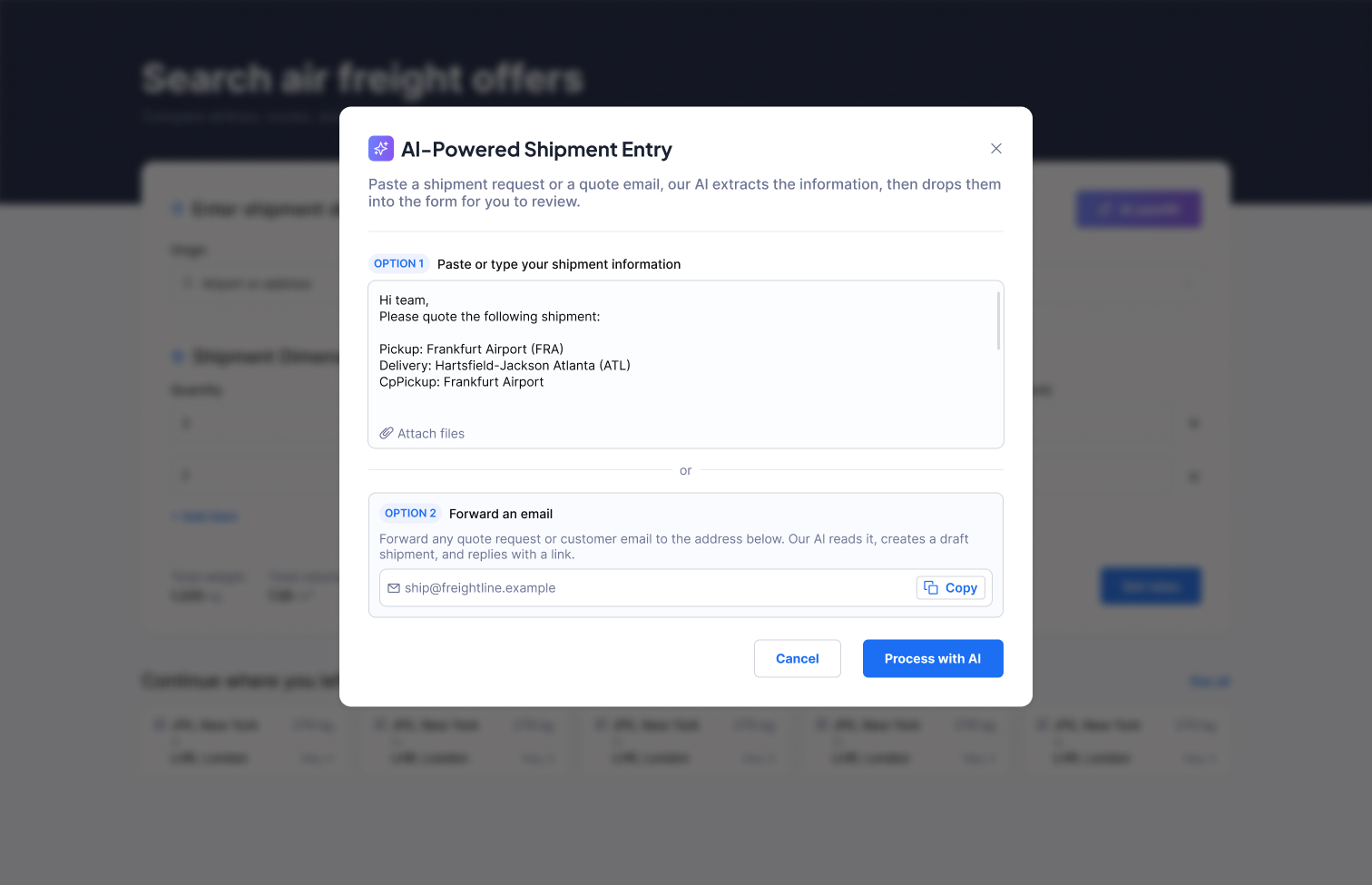
Users could paste email text directly into the modal, or forward the email to a dedicated address. The forwarding agent reads the email (including attachments), creates a structured shipment, and sends back a reply with a direct link to the search results, removing the need to open the platform at all to initiate a search.
04
Discoverability by design
The forwarding email address was surfaced inside the modal itself, so users who came in through the paste flow were immediately informed of the faster alternative. Combined with a platform announcement at launch, this created a natural discovery path without requiring separate onboarding.
The flow
From inbox to search in under 10 seconds
-
01
Email arrives
A customer sends a shipment request by email: route, dimensions, weight, cargo type, often as free text or a forwarded chain with attachments.
-
02
Paste or forward
The agent pastes the email text into the AI modal on the platform, or forwards the email directly to the platform’s dedicated address. Attachments are supported in both paths.
-
03
AI extracts and structures
The AI reads the email and populates the shipment input fields. Fields it cannot determine with confidence are left blank with a red border, never guessed.
-
04
User reviews and confirms
The agent is returned to the filled input form. A banner signals that the data was AI-generated and should be verified. Missing fields are immediately visible. The user corrects or confirms and runs the search.
-
05
Results, ready to act on
The search runs and returns live rates. From here, the user can quote, request a better rate, or book, all within the same platform, with no data re-entry.
Outcomes
A measurable shift in how work starts
Time-to-search, meaning the time from receiving an email to initiating a rate search, dropped from 2–5 minutes of manual work to under 10 seconds. This was calculated from user data across the platform, comparing session patterns before and after the feature shipped.
Beyond speed, the feature changed how users perceived the platform: rather than a tool they had to re-enter data into, it became the place where their work actually started.
~10s
Time to initiate a search after receiving an email, down from 2–5 minutes of manual entry
70–80%
Reduction in manual data entry per shipment, based on user session data
100
Real customer emails used to test and validate the AI prompt before shipping